Mount an ISO image on a Solaris/AIX filesystem
Solaris
lofiadm -a /export/temp/software.iso /dev/lofi/1
The lofi device creates a block device version of a file. This block device can be mounted to /mnt with the following command:
mount -F hsfs -o ro /dev/lofi/1 /mnt
These commands can be combined into a single command:
mount -F hsfs -o ro `lofiadm -a /export/temp/software.iso` /mnt
Unmount and close loopback filesystem
umount /mnt
lofiadm -d /dev/lofi/1
AIX 5.3
mklv -y cdlv -s n -L /dev/cdlv vg00 $(du -m 10gR2.iso|awk '{print
int($1+128)"M"}') hdisk2 ## 128M pp say
dd if=10gR2.iso of=/dev/cdlv # took hours
mount -v cdrfs -o ro /dev/cdlv /mnt/iso
Wednesday, July 09, 2008


Friday, July 04, 2008
Red Hat 4.6 AS x64_EMT
IBM/LSI RDAC LINUX DRIVERS INSTALL
- IBM x3850
- 2 x Emulex 4Gb FC Cards
- Redhat 4 AS x64_EMT (lastest patches - up2date)
- IBM DS4700 Storage - Direct Attached
This is required to be done on every kernel update.
Install kernel update through normal procedure (up2date) and reboot into new kernel
Use "uname -a" to show kernel details.
Check you using the correct C complier.
ls -ial /usr/bin/gcc
should be a link to /usr/bin/linuxEMT_64-gcc
If its not please change the link or update the CC flag in the LSI RDAC driver make file.
Download RDAC driver from LSI http://www.lsi.com/rdac/ds4000.html
Select 2.6 Kernel Version (Suports RHEL 4 U5)
Unpack
| [root@main download]# ls rdac-LINUX-09.01.B5.76-source.tar.gz [root@main download]# gzip -d rdac-LINUX-09.01.B5.76-source.tar.gz [root@main download]# tar xf rdac-LINUX-09.01.B5.76-source.tar [root@main download]# ls linuxrdac-09.01.B5.76 rdac-LINUX-09.01.B5.76-source.tar [root@main download]# cd linuxrdac-09.01.B5.76 [root@main linuxrdac-09.01.B5.76]# ls genfileattributes mppiscsi_umountall mppLnx26_vhbaproc.c genuniqueid.c mpp_linux_headers mppLnx26_vhbatask.c hbaCheck mpp_linux_sys_headers mpp_rcscript.REDHAT License.txt mppLnx26_spinlock_size.c mpp_rcscript.SUSE lsvdev mppLnx26_sysdep.c mppSupport Makefile mppLnx26_upper.c Readme.txt mppCmn_s2tos3.c mppLnx26_vhba.c setupDriver.REDHAT mppCmn_SysInterface.c mppLnx26_vhbaio.c setupDriver.SUSE mpp.conf mppLnx26_vhbalib.c utility MPP_hba.c mppLnx26_vhbamisc.c |
| [root@main linuxrdac-09.01.B5.76]# make make V=1 -C/lib/modules/2.6.9-67.ELlargesmp/build M=/home/apaton/download/linuxrdac-09.01.B5.76 MODVERDIR=/lib/modules/2.6.9-67.ELlargesmp/build/.tmp_versions SUBDIRS=/home/apaton/download/linuxrdac-09.01.B5.76 modules make[1]: Entering directory `/usr/src/kernels/2.6.9-67.EL-largesmp-x86_64' mkdir -p /lib/modules/2.6.9-67.ELlargesmp/build/.tmp_versions make -f scripts/Makefile.build obj=/home/apaton/download/linuxrdac-09.01.B5.76 gcc -Wp,-MD,/home/apaton/download/linuxrdac-09.01.B5.76/.MPP_hba.o.d -nostdinc -iwithprefix include -D__KERNEL__ -Iinclude -Wall -Wstrict-prototypes -Wno-trigraphs -fno-strict-aliasing -fno-common -Os -fomit-frame-pointer -g -Wdeclaration-after-statement -mno-red-zone -mcmodel=kernel -pipe -fno-reorder-blocks -Wno-sign-compare -funit-at-a-time -I/home/apaton/download/linuxrdac-09.01.B5.76 -I/home/apaton/download/linuxrdac-09.01.B5.76/mpp_linux_headers/ -I/home/apaton/download/linuxrdac-09.01.B5.76/mpp_linux_sys_headers/ -DMODULE -DKBUILD_BASENAME=MPP_hba -DKBUILD_MODNAME=mppUpper -c -o /home/apaton/download/linuxrdac-09.01.B5.76/.tmp_MPP_hba.o /home/apaton/download/linuxrdac-09.01.B5.76/MPP_hba.c gcc -Wp,-MD,/home/apaton/download/linuxrdac-09.01.B5.76/.mppLnx26_upper.o.d -nostdinc -iwithprefix include -D__KERNEL__ -Iinclude -Wall -Wstrict-prototypes -Wno-trigraphs -fno-strict-aliasing -fno-common -Os -fomit-frame-pointer -g -Wdeclaration-after-statement -mno-red-zone -mcmodel=kernel -pipe -fno-reorder-blocks -Wno-sign-compare -funit-at-a-time -I/home/apaton/download/linuxrdac-09.01.B5.76 -I/home/apaton/download/linuxrdac-09.01.B5.76/mpp_linux_headers/ -I/home/apaton/download/linuxrdac-09.01.B5.76/mpp_linux_sys_headers/ -DMODULE -DKBUILD_BASENAME=mppLnx26_upper -DKBUILD_MODNAME=mppUpper -c -o /home/apaton/download/linuxrdac-09.01.B5.76/.tmp_mppLnx26_upper.o /home/apaton/download/linuxrdac-09.01.B5.76/mppLnx26_upper.c gcc -Wp,-MD,/home/apaton/download/linuxrdac-09.01.B5.76/.mppLnx26_sysdep.o.d -nostdinc -iwithprefix include -D__KERNEL__ -Iinclude -Wall -Wstrict-prototypes -Wno-trigraphs -fno-strict-aliasing -fno-common -Os -fomit-frame-pointer -g -Wdeclaration-after-statement -mno-red-zone -mcmodel=kernel -pipe -fno-reorder-blocks -Wno-sign-compare -funit-at-a-time -I/home/apaton/download/linuxrdac-09.01.B5.76 -I/home/apaton/download/linuxrdac-09.01.B5.76/mpp_linux_headers/ -I/home/apaton/download/linuxrdac-09.01.B5.76/mpp_linux_sys_headers/ -DMODULE -DKBUILD_BASENAME=mppLnx26_sysdep -DKBUILD_MODNAME=mppUpper -c -o /home/apaton/download/linuxrdac-09.01.B5.76/.tmp_mppLnx26_sysdep.o /home/apaton/download/linuxrdac-09.01.B5.76/mppLnx26_sysdep.c gcc -Wp,-MD,/home/apaton/download/linuxrdac-09.01.B5.76/.mppCmn_s2tos3.o.d -nostdinc -iwithprefix include -D__KERNEL__ -Iinclude -Wall -Wstrict-prototypes -Wno-trigraphs -fno-strict-aliasing -fno-common -Os -fomit-frame-pointer -g -Wdeclaration-after-statement -mno-red-zone -mcmodel=kernel -pipe -fno-reorder-blocks -Wno-sign-compare -funit-at-a-time -I/home/apaton/download/linuxrdac-09.01.B5.76 -I/home/apaton/download/linuxrdac-09.01.B5.76/mpp_linux_headers/ -I/home/apaton/download/linuxrdac-09.01.B5.76/mpp_linux_sys_headers/ -DMODULE -DKBUILD_BASENAME=mppCmn_s2tos3 -DKBUILD_MODNAME=mppUpper -c -o /home/apaton/download/linuxrdac-09.01.B5.76/.tmp_mppCmn_s2tos3.o /home/apaton/download/linuxrdac-09.01.B5.76/mppCmn_s2tos3.c gcc -Wp,-MD,/home/apaton/download/linuxrdac-09.01.B5.76/.mppCmn_SysInterface.o.d -nostdinc -iwithprefix include -D__KERNEL__ -Iinclude -Wall -Wstrict-prototypes -Wno-trigraphs -fno-strict-aliasing -fno-common -Os -fomit-frame-pointer -g -Wdeclaration-after-statement -mno-red-zone -mcmodel=kernel -pipe -fno-reorder-blocks -Wno-sign-compare -funit-at-a-time -I/home/apaton/download/linuxrdac-09.01.B5.76 -I/home/apaton/download/linuxrdac-09.01.B5.76/mpp_linux_headers/ -I/home/apaton/download/linuxrdac-09.01.B5.76/mpp_linux_sys_headers/ -DMODULE -DKBUILD_BASENAME=mppCmn_SysInterface -DKBUILD_MODNAME=mppUpper -c -o /home/apaton/download/linuxrdac-09.01.B5.76/.tmp_mppCmn_SysInterface.o /home/apaton/download/linuxrdac-09.01.B5.76/mppCmn_SysInterface.c gcc -Wp,-MD,/home/apaton/download/linuxrdac-09.01.B5.76/.mppLnx26_vhba.o.d -nostdinc -iwithprefix include -D__KERNEL__ -Iinclude -Wall -Wstrict-prototypes -Wno-trigraphs -fno-strict-aliasing -fno-common -Os -fomit-frame-pointer -g -Wdeclaration-after-statement -mno-red-zone -mcmodel=kernel -pipe -fno-reorder-blocks -Wno-sign-compare -funit-at-a-time -I/home/apaton/download/linuxrdac-09.01.B5.76 -I/home/apaton/download/linuxrdac-09.01.B5.76/mpp_linux_headers/ -I/home/apaton/download/linuxrdac-09.01.B5.76/mpp_linux_sys_headers/ -DMODULE -DKBUILD_BASENAME=mppLnx26_vhba -DKBUILD_MODNAME=mppVhba -c -o /home/apaton/download/linuxrdac-09.01.B5.76/.tmp_mppLnx26_vhba.o /home/apaton/download/linuxrdac-09.01.B5.76/mppLnx26_vhba.c gcc -Wp,-MD,/home/apaton/download/linuxrdac-09.01.B5.76/.mppLnx26_vhbaio.o.d -nostdinc -iwithprefix include -D__KERNEL__ -Iinclude -Wall -Wstrict-prototypes -Wno-trigraphs -fno-strict-aliasing -fno-common -Os -fomit-frame-pointer -g -Wdeclaration-after-statement -mno-red-zone -mcmodel=kernel -pipe -fno-reorder-blocks -Wno-sign-compare -funit-at-a-time -I/home/apaton/download/linuxrdac-09.01.B5.76 -I/home/apaton/download/linuxrdac-09.01.B5.76/mpp_linux_headers/ -I/home/apaton/download/linuxrdac-09.01.B5.76/mpp_linux_sys_headers/ -DMODULE -DKBUILD_BASENAME=mppLnx26_vhbaio -DKBUILD_MODNAME=mppVhba -c -o /home/apaton/download/linuxrdac-09.01.B5.76/.tmp_mppLnx26_vhbaio.o /home/apaton/download/linuxrdac-09.01.B5.76/mppLnx26_vhbaio.c gcc -Wp,-MD,/home/apaton/download/linuxrdac-09.01.B5.76/.mppLnx26_vhbatask.o.d -nostdinc -iwithprefix include -D__KERNEL__ -Iinclude -Wall -Wstrict-prototypes -Wno-trigraphs -fno-strict-aliasing -fno-common -Os -fomit-frame-pointer -g -Wdeclaration-after-statement -mno-red-zone -mcmodel=kernel -pipe -fno-reorder-blocks -Wno-sign-compare -funit-at-a-time -I/home/apaton/download/linuxrdac-09.01.B5.76 -I/home/apaton/download/linuxrdac-09.01.B5.76/mpp_linux_headers/ -I/home/apaton/download/linuxrdac-09.01.B5.76/mpp_linux_sys_headers/ -DMODULE -DKBUILD_BASENAME=mppLnx26_vhbatask -DKBUILD_MODNAME=mppVhba -c -o /home/apaton/download/linuxrdac-09.01.B5.76/.tmp_mppLnx26_vhbatask.o /home/apaton/download/linuxrdac-09.01.B5.76/mppLnx26_vhbatask.c gcc -Wp,-MD,/home/apaton/download/linuxrdac-09.01.B5.76/.mppLnx26_vhbalib.o.d -nostdinc -iwithprefix include -D__KERNEL__ -Iinclude -Wall -Wstrict-prototypes -Wno-trigraphs -fno-strict-aliasing -fno-common -Os -fomit-frame-pointer -g -Wdeclaration-after-statement -mno-red-zone -mcmodel=kernel -pipe -fno-reorder-blocks -Wno-sign-compare -funit-at-a-time -I/home/apaton/download/linuxrdac-09.01.B5.76 -I/home/apaton/download/linuxrdac-09.01.B5.76/mpp_linux_headers/ -I/home/apaton/download/linuxrdac-09.01.B5.76/mpp_linux_sys_headers/ -DMODULE -DKBUILD_BASENAME=mppLnx26_vhbalib -DKBUILD_MODNAME=mppVhba -c -o /home/apaton/download/linuxrdac-09.01.B5.76/.tmp_mppLnx26_vhbalib.o /home/apaton/download/linuxrdac-09.01.B5.76/mppLnx26_vhbalib.c gcc -Wp,-MD,/home/apaton/download/linuxrdac-09.01.B5.76/.mppLnx26_vhbamisc.o.d -nostdinc -iwithprefix include -D__KERNEL__ -Iinclude -Wall -Wstrict-prototypes -Wno-trigraphs -fno-strict-aliasing -fno-common -Os -fomit-frame-pointer -g -Wdeclaration-after-statement -mno-red-zone -mcmodel=kernel -pipe -fno-reorder-blocks -Wno-sign-compare -funit-at-a-time -I/home/apaton/download/linuxrdac-09.01.B5.76 -I/home/apaton/download/linuxrdac-09.01.B5.76/mpp_linux_headers/ -I/home/apaton/download/linuxrdac-09.01.B5.76/mpp_linux_sys_headers/ -DMODULE -DKBUILD_BASENAME=mppLnx26_vhbamisc -DKBUILD_MODNAME=mppVhba -c -o /home/apaton/download/linuxrdac-09.01.B5.76/.tmp_mppLnx26_vhbamisc.o /home/apaton/download/linuxrdac-09.01.B5.76/mppLnx26_vhbamisc.c gcc -Wp,-MD,/home/apaton/download/linuxrdac-09.01.B5.76/.mppLnx26_vhbaproc.o.d -nostdinc -iwithprefix include -D__KERNEL__ -Iinclude -Wall -Wstrict-prototypes -Wno-trigraphs -fno-strict-aliasing -fno-common -Os -fomit-frame-pointer -g -Wdeclaration-after-statement -mno-red-zone -mcmodel=kernel -pipe -fno-reorder-blocks -Wno-sign-compare -funit-at-a-time -I/home/apaton/download/linuxrdac-09.01.B5.76 -I/home/apaton/download/linuxrdac-09.01.B5.76/mpp_linux_headers/ -I/home/apaton/download/linuxrdac-09.01.B5.76/mpp_linux_sys_headers/ -DMODULE -DKBUILD_BASENAME=mppLnx26_vhbaproc -DKBUILD_MODNAME=mppVhba -c -o /home/apaton/download/linuxrdac-09.01.B5.76/.tmp_mppLnx26_vhbaproc.o /home/apaton/download/linuxrdac-09.01.B5.76/mppLnx26_vhbaproc.c ld -m elf_x86_64 -r -o /home/apaton/download/linuxrdac-09.01.B5.76/mppUpper.o /home/apaton/download/linuxrdac-09.01.B5.76/MPP_hba.o /home/apaton/download/linuxrdac-09.01.B5.76/mppLnx26_upper.o /home/apaton/download/linuxrdac-09.01.B5.76/mppLnx26_sysdep.o /home/apaton/download/linuxrdac-09.01.B5.76/mppCmn_s2tos3.o /home/apaton/download/linuxrdac-09.01.B5.76/mppCmn_SysInterface.o ld -m elf_x86_64 -r -o /home/apaton/download/linuxrdac-09.01.B5.76/mppVhba.o /home/apaton/download/linuxrdac-09.01.B5.76/mppLnx26_vhba.o /home/apaton/download/linuxrdac-09.01.B5.76/mppLnx26_vhbaio.o /home/apaton/download/linuxrdac-09.01.B5.76/mppLnx26_vhbatask.o /home/apaton/download/linuxrdac-09.01.B5.76/mppLnx26_vhbalib.o /home/apaton/download/linuxrdac-09.01.B5.76/mppLnx26_vhbamisc.o /home/apaton/download/linuxrdac-09.01.B5.76/mppLnx26_vhbaproc.o Building modules, stage 2. make -rR -f /usr/src/kernels/2.6.9-67.EL-largesmp-x86_64/scripts/Makefile.modpost scripts/mod/modpost -m -i /usr/src/kernels/2.6.9-67.EL-largesmp-x86_64/Module.symvers /home/apaton/download/linuxrdac-09.01.B5.76/mppUpper.o /home/apaton/download/linuxrdac-09.01.B5.76/mppVhba.o gcc -Wp,-MD,/home/apaton/download/linuxrdac-09.01.B5.76/.mppUpper.mod.o.d -nostdinc -iwithprefix include -D__KERNEL__ -Iinclude -Wall -Wstrict-prototypes -Wno-trigraphs -fno-strict-aliasing -fno-common -Os -fomit-frame-pointer -g -Wdeclaration-after-statement -mno-red-zone -mcmodel=kernel -pipe -fno-reorder-blocks -Wno-sign-compare -funit-at-a-time -DKBUILD_BASENAME=mppUpper -DKBUILD_MODNAME=mppUpper -DMODULE -c -o /home/apaton/download/linuxrdac-09.01.B5.76/mppUpper.mod.o /home/apaton/download/linuxrdac-09.01.B5.76/mppUpper.mod.c ld -m elf_x86_64 -r -o /home/apaton/download/linuxrdac-09.01.B5.76/mppUpper.ko /home/apaton/download/linuxrdac-09.01.B5.76/mppUpper.o /home/apaton/download/linuxrdac-09.01.B5.76/mppUpper.mod.o gcc -Wp,-MD,/home/apaton/download/linuxrdac-09.01.B5.76/.mppVhba.mod.o.d -nostdinc -iwithprefix include -D__KERNEL__ -Iinclude -Wall -Wstrict-prototypes -Wno-trigraphs -fno-strict-aliasing -fno-common -Os -fomit-frame-pointer -g -Wdeclaration-after-statement -mno-red-zone -mcmodel=kernel -pipe -fno-reorder-blocks -Wno-sign-compare -funit-at-a-time -DKBUILD_BASENAME=mppVhba -DKBUILD_MODNAME=mppVhba -DMODULE -c -o /home/apaton/download/linuxrdac-09.01.B5.76/mppVhba.mod.o /home/apaton/download/linuxrdac-09.01.B5.76/mppVhba.mod.c ld -m elf_x86_64 -r -o /home/apaton/download/linuxrdac-09.01.B5.76/mppVhba.ko /home/apaton/download/linuxrdac-09.01.B5.76/mppVhba.o /home/apaton/download/linuxrdac-09.01.B5.76/mppVhba.mod.o make[1]: Leaving directory `/usr/src/kernels/2.6.9-67.EL-largesmp-x86_64' make V=1 -C/lib/modules/2.6.9-67.ELlargesmp/build M=/home/apaton/download/linuxrdac-09.01.B5.76 MODVERDIR=/lib/modules/2.6.9-67.ELlargesmp/build/.tmp_versions SUBDIRS=/home/apaton/download/linuxrdac-09.01.B5.76 modules make[1]: Entering directory `/usr/src/kernels/2.6.9-67.EL-largesmp-x86_64' mkdir -p /lib/modules/2.6.9-67.ELlargesmp/build/.tmp_versions make -f scripts/Makefile.build obj=/home/apaton/download/linuxrdac-09.01.B5.76 Building modules, stage 2. make -rR -f /usr/src/kernels/2.6.9-67.EL-largesmp-x86_64/scripts/Makefile.modpost scripts/mod/modpost -m -i /usr/src/kernels/2.6.9-67.EL-largesmp-x86_64/Module.symvers /home/apaton/download/linuxrdac-09.01.B5.76/mppUpper.o /home/apaton/download/linuxrdac-09.01.B5.76/mppVhba.o make[1]: Leaving directory `/usr/src/kernels/2.6.9-67.EL-largesmp-x86_64' gcc -D__KERNEL__ -I/lib/modules/2.6.9-67.ELlargesmp/build/include mppLnx26_spinlock_size.c -o mppLnx_Spinlock_Size gcc -I/home/apaton/download/linuxrdac-09.01.B5.76 -I/home/apaton/download/linuxrdac-09.01.B5.76/mpp_linux_headers/ -I/home/apaton/download/linuxrdac-09.01.B5.76/mpp_linux_sys_headers/ -c ./utility/mppUtil.c -o mppUtil.o /bin/bash ./genfileattributes bld gcc -I/home/apaton/download/linuxrdac-09.01.B5.76 -I/home/apaton/download/linuxrdac-09.01.B5.76/mpp_linux_headers/ -I/home/apaton/download/linuxrdac-09.01.B5.76/mpp_linux_sys_headers/ -c ./utility/mppUtil26_sysdep.c -o mppUtilSysdep.o gcc mppUtil.o mppUtilSysdep.o -o mppUtil gcc -o genuniqueid genuniqueid.c |
| [root@main linuxrdac-09.01.B5.76]# make install make V=1 -C/lib/modules/2.6.9-67.ELlargesmp/build M=/home/apaton/download/linuxrdac-09.01.B5.76 MODVERDIR=/lib/modules/2.6.9-67.ELlargesmp/build/.tmp_versions SUBDIRS=/home/apaton/download/linuxrdac-09.01.B5.76 modules make[1]: Entering directory `/usr/src/kernels/2.6.9-67.EL-largesmp-x86_64' mkdir -p /lib/modules/2.6.9-67.ELlargesmp/build/.tmp_versions make -f scripts/Makefile.build obj=/home/apaton/download/linuxrdac-09.01.B5.76 Building modules, stage 2. make -rR -f /usr/src/kernels/2.6.9-67.EL-largesmp-x86_64/scripts/Makefile.modpost scripts/mod/modpost -m -i /usr/src/kernels/2.6.9-67.EL-largesmp-x86_64/Module.symvers /home/apaton/download/linuxrdac-09.01.B5.76/mppUpper.o /home/apaton/download/linuxrdac-09.01.B5.76/mppVhba.o make[1]: Leaving directory `/usr/src/kernels/2.6.9-67.EL-largesmp-x86_64' make V=1 -C/lib/modules/2.6.9-67.ELlargesmp/build M=/home/apaton/download/linuxrdac-09.01.B5.76 MODVERDIR=/lib/modules/2.6.9-67.ELlargesmp/build/.tmp_versions SUBDIRS=/home/apaton/download/linuxrdac-09.01.B5.76 modules make[1]: Entering directory `/usr/src/kernels/2.6.9-67.EL-largesmp-x86_64' mkdir -p /lib/modules/2.6.9-67.ELlargesmp/build/.tmp_versions make -f scripts/Makefile.build obj=/home/apaton/download/linuxrdac-09.01.B5.76 Building modules, stage 2. make -rR -f /usr/src/kernels/2.6.9-67.EL-largesmp-x86_64/scripts/Makefile.modpost scripts/mod/modpost -m -i /usr/src/kernels/2.6.9-67.EL-largesmp-x86_64/Module.symvers /home/apaton/download/linuxrdac-09.01.B5.76/mppUpper.o /home/apaton/download/linuxrdac-09.01.B5.76/mppVhba.o make[1]: Leaving directory `/usr/src/kernels/2.6.9-67.EL-largesmp-x86_64' /bin/bash ./genfileattributes bld gcc -I/home/apaton/download/linuxrdac-09.01.B5.76 -I/home/apaton/download/linuxrdac-09.01.B5.76/mpp_linux_headers/ -I/home/apaton/download/linuxrdac-09.01.B5.76/mpp_linux_sys_headers/ -c ./utility/mppUtil26_sysdep.c -o mppUtilSysdep.o gcc mppUtil.o mppUtilSysdep.o -o mppUtil Checking Host Adapter Configuration... Detected 2 Emulex Host Adapter Port(s) on the system Please wait while we modify the system configuration files. Your kernel version is 2.6.9-67.ELlargesmp Preparing to install MPP driver against this kernel version... Generating module dependencies... Creating new MPP initrd image... You must now edit your boot loader configuration file, /boot/grub/menu.lst, to add a new boot menu, which uses mpp-2.6.9-67.ELlargesmp.img as the initrd image. Now Reboot the system for MPP to take effect. The new boot menu entry should look something like this (note that it may vary with different system configuration): ... title Red Hat Linux (2.6.9-67.ELlargesmp) with MPP support root (hd0,5) kernel /vmlinuz-2.6.9-67.ELlargesmp ro root=LABEL=RH9 initrd /mpp-2.6.9-67.ELlargesmp.img ... MPP driver package has been successfully installed on your system. |
Check that the make install script has found your Fibre Channel HBA's.
Update Grub boot loader to use the kernel (Note the initrd line changed plus the description)
| [root@main linuxrdac-09.01.B5.76]# cat /boot/grub/menu.lst # grub.conf generated by anaconda # # Note that you do not have to rerun grub after making changes to this file # NOTICE: You have a /boot partition. This means that # all kernel and initrd paths are relative to /boot/, eg. # root (hd0,0) # kernel /vmlinuz-version ro root=/dev/VolGroup00/LogVol00 # initrd /initrd-version.img #boot=/dev/sda default=2 timeout=5 splashimage=(hd0,0)/grub/splash.xpm.gz hiddenmenu title Red Hat Enterprise Linux AS (2.6.9-67.ELlargesmp) root (hd0,0) kernel /vmlinuz-2.6.9-67.ELlargesmp ro root=/dev/VolGroup00/LogVol00 rhgb quiet initrd /initrd-2.6.9-67.ELlargesmp.img title Red Hat Enterprise Linux AS-up (2.6.9-67.EL) root (hd0,0) kernel /vmlinuz-2.6.9-67.EL ro root=/dev/VolGroup00/LogVol00 rhgb quiet initrd /initrd-2.6.9-67.EL.img title Red Hat Enterprise Linux AS IBM-MPP (2.6.9-67.ELlargesmp) root (hd0,0) kernel /vmlinuz-2.6.9-67.ELlargesmp ro root=/dev/VolGroup00/LogVol00 rhgb quiet initrd /mpp-2.6.9-67.ELlargesmp.img |
Check Status using the PROC file system
[root@main ~]# cat /proc/mpp/ifs-storage/virtualLun0 Linux MPP driver. Version:09.01.B5.76 Build:Thu Aug 30 15:11:23 CDT 2007 Lun WWN:600a0b80002ae8c40000025e479b3506 Virtual Scsi Address: host_no:3 channel:0 target:0 Lun:0 Queue Depth = 28 I/O Statistics: Number of IOs:40 Longest trip of all I/Os:0 Shortest trip of all I/Os:0 Number of occurrences of path failover events:0 Number of occurrences of controller failover events:0 The longest Controller Failover Time:0 The shortest Controller Failover Time:0 total size:484 [root@main ~]# cat /proc/mpp/ifs-storage/controllerA/lpfc_h1c0t0/ LUN0 LUN2 LUN4 LUN6 UTM_LUN31 LUN1 LUN3 LUN5 LUN7 [root@main ~]# cat /proc/mpp/ifs-storage/controllerA/lpfc_h1c0t0/LUN0 Linux MPP driver. Version:09.01.B5.76 Build:Thu Aug 30 15:11:23 CDT 2007 Lun WWN:600a0b80002ae8c40000025e479b3506 Physical HBA driver: lpfc Device Scsi Address: host_no:1 channel:0 target:0 Lun:0 Queue Depth = 30 I/O Statistics: Number of IOs:42 Longest trip of all I/Os:0 Shortest trip of all I/Os:0 Number of occurences of IO failed events:0 Device state: [0] OPTIMAL Device state: [1] OPTIMAL Device state: [2] OPTIMAL Device state: [3] OPTIMAL Device state: [4] OPTIMAL Device state: [5] OPTIMAL Device state: [6] OPTIMAL Device state: [7] OPTIMAL Device state: [8] OPTIMAL Device state: [9] OPTIMAL Path state:[8] OPTIMAL Path state:[9] OPTIMAL Path state:[0] OPTIMAL_NEED_CHECK Path state:[1] OPTIMAL_CHECKING Path state:[2] OPTIMAL Path state:[3] OPTIMAL_NEED_CHECK Path state:[4] OPTIMAL_CHECKING Path state:[5] OPTIMAL Path state:[6] OPTIMAL_NEED_CHECK Path state:[7] OPTIMAL_CHECKING Controller Failed? 0 total size:1099 |
Config Files
/etc/mpp.conf/etc/modprobe.conf
/opt/mpp/modprobe.conf.mppappend
| [root@main etc]# cat /etc/mpp.conf VirtualDiskProductId=VirtualDisk DebugLevel=0x0 NotReadyWaitTime=270 BusyWaitTime=270 QuiescenceWaitTime=270 InquiryWaitTime=60 MaxLunsPerArray=256 MaxPathsPerController=4 ScanInterval=60 InquiryInterval=1 MaxArrayModules=30 ErrorLevel=3 SelectionTimeoutRetryCount=0 UaRetryCount=10 RetryCount=10 SynchTimeout=170 FailOverQuiescenceTime=20 FailoverTimeout=120 FailBackToCurrentAllowed=1 ControllerIoWaitTime=300 ArrayIoWaitTime=600 DisableLUNRebalance=0 IdlePathCheckingInterval=60 RecheckFailedPathWaitTime=30 FailedPathCheckingInterval=60 ArrayFailoverWaitTime=300 PrintSenseBuffer=0 S2ToS3Key=2e67f55c3f210c1c |
| [root@main mpp]# cat /etc/modprobe.conf alias eth0 tg3 alias eth1 tg3 alias scsi_hostadapter aacraid alias scsi_hostadapter1 lpfc alias usb-controller ehci-hcd alias usb-controller1 ohci-hcd ### BEGIN MPP Driver Comments ### remove mppUpper if [ `ls -a /proc/mpp | wc -l` -gt 2 ]; then echo -e "Please Unload Physical HBA Driver prior to unloading mppUpper."; else /sbin/modprobe -r --ignore-remove mppUpper; fi # Additional config info can be found in /opt/mpp/modprobe.conf.mppappend. # The Above config info is needed if you want to make mkinitrd manually. # Please read the Readme file that came with MPP driver for building RamDisk manually. # Edit the '/etc/modprobe.conf' file and run 'mppUpdate' to create Ramdisk dynamically. ### END MPP Driver Comments ### |
| [root@main mpp]# cat /opt/mpp/modprobe.conf.mppappend ### BEGIN OF MPP Driver Changes ### options scsi_mod max_report_luns=256 max_luns=512 alias scsi_hostadapter99 mppVhba options lpfc lpfc_nodev_tmo=60 alias scsi_hostadapter97 lpfc ## END OF MPP Driver Changes ### |
| [root@main ~]# mppBusRescan Starting new devices re-scan... scan lpfc HBA host /sys/class/scsi_host/host2... no new device found scan lpfc HBA host /sys/class/scsi_host/host1... no new device found run /usr/sbin/mppUtil -s busscan... scan mpp virtual host /sys/class/scsi_host/host3... no new virtual device found /usr/sbin/mppBusRescan is completed. |
| [root@main ~]# mppUtil -S H3C0T0 Active Active ifs-storage H1C0T0L000 Up H2C0T0L000 Up H1C0T0L001 Up H2C0T0L001 Up H1C0T0L002 Up H2C0T0L002 Up H1C0T0L003 Up H2C0T0L003 Up H1C0T0L004 Up H2C0T0L004 Up H1C0T0L005 Up H2C0T0L005 Up H1C0T0L006 Up H2C0T0L006 Up H1C0T0L007 Up H2C0T0L007 Up Missing Arrays There are no missing arrays |


T3 Setup for Vmware
Config - through SAN switch 5200, zones with multiple targets but single initiators.
set ip 192.168.10.198
set gateway 192.168.10.254
vol add v0 data u1d1-4 raid 5 standby u1d9
vol init v0 data
vol mount v0
volslice create vmfs -z 116GB v0
sys fc_topology fabric_p2p
sys mirror off
sys cache writethrough
lun default all_lun rw
Wednesday, July 25, 2007
Xen & VxVM

The guys over at XenSource have pulled a master stoke, they have announced they will be integrating VxVM & VxFS into their Enterprise product. I'm a VMWARE VCP and it always amazed me that the VMWARE ESX didn't support fibre multipathing with load balancing. I've always taken multipathing for granted with Veritas (Symantec) VxVM DMP (a must with Photons) and latter MPXIO in Solaris.
I'm sure VMWARE will add EMC PowerPath soon to push along those CLARiiON.
Remember you can get Veritas Volume manager for free, check this blog post.
Sunday, April 29, 2007

Tuesday, April 17, 2007
NFS Server on Windows setup guide

Created a simple guide for all on setting up Microsoft Windows SFU (Services For UNIX) - NFS Server.
Note: it doesn't cover user mapping.
http://docs.google.com/Doc?id=dcxf52h3_32ckjkbh
http://tinyurl.com/2pyswk
Wednesday, January 24, 2007
small problem seting up jumpstart

I have a central jumpstart server delivering Solaris 8 , 9 & 10 to the engineering workshop. Its recently been upgraded from an Ultra 2 to a V20z running Solaris 10 x86.
A colleague came over a problem with the Solaris 8 add_install_client, producing adb errors. On closer observation the add_install_client incorrectly parses output from the ifconfig command, but only when zones are running. ifconfig list which zone owns the interface and this what Solaris 8 add_install_client script fails to cope with.
Workaround, make the following changes in blue at line number 1939 to add_install_client
read inet ipaddr netmask mask broadcast broadaddr
if [ "${ifname}" = "lo0:" ]; then
continue;
fi
if [ "$inet" = "zone" ]; then
# Found an interface dedicated to a local zone.
# Read in the real "inet" line and continue.
read inet ipaddr netmask mask broadcast broadaddr
continue;
fi
Tuesday, January 09, 2007
Junk mail with free USB pendrive loaded with malware

I've got to worry about this attack. My MD was sent a USB pendrive in a box with corporate literature from "Tune-into-it.com". Unusually :-D the literature didn't express what Tune-into-it.com does, so my MD trashed the literature and kept the pen drive for later viewing. Today he viewed the USB pendrive and instantly the Trend Anti Virus found
- TROJ_SMALL.EAK in "AutoSvr.exe"
- PE_Chir.B in "IT Newsletter PC.exe"
Now what worries me is was either a,
- A targeted attack aimed my MD.
- A attack against my company.
- or a mass junkmail attack.
- Or Tune-into-it.com is vaild company and have unfortunately been infected with a virus.
Unfortunately I didn't get to the pendrive before it was formatted and blanked by a colleague. Just goes to prove that my Firewall and AntiVirus mail filter doesn't catch everything, just sent it in the post and ask the MD to run it! Simple! . I'm pretty sure I would have probably done the same thing, so be warned!
apaton
Sunday, October 29, 2006
30 Years of public-key cryptography

A turning point in cryptography happen 30 years ago. Whitfield Diffie and Martin Hellman released a paper titled New Directions in Cryptography. This paper goes on to define ideas around public-key cryptography plus more!
Listen to podcast of Diffie, Hellman and other panellist at the event to mark the occasion.
Saturday, October 28, 2006
Redhat and Oracle, Unbreakable or Unfakeable

Oracle has announded that it will be supporting Redhat under the Unbrakable Linux program. Redhat have responded with an unfakeable advertisement.
Hacked Car Park Sign?
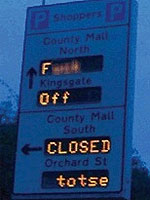
An excellent hack, what did they hack into, the sign its self or the backend computer? More details can be found at The Register

Friday, October 20, 2006
The 250th Black Country Derby,

A football match has never caused me to blog until now. Wolves are playing away at the Hawthorns against West Bromwich Albion on Sunday 22nd October 2006, High Noon kick off!. It's been 4 years, 10 months, 21 days since the last game and I couldn't get tickets for the game :-( . I'm missing out on the most eletric atmosphere ever". I'm planning to drive by the Hawthornes just to hear it!
Now, the result is key, Mick McCarthy's Wolves must draw or win so I can hold my head up high on work Monday morning. Albion are on form and are scoring goals with new manager (Tony Mowbray) , assist manager ex wolves (Mark Venus) all lines up for us to get beat! But I have FAITH!
Come on ye WOLVES
Saturday, October 14, 2006
Free NES emulator in browser!
Play those old NES games within our browser http://vnes.thatsanderskid.com/
Loads of time guaranteed to be wasted reminiscing over those old games. My favorite is Kung Fu.
Loads of time guaranteed to be wasted reminiscing over those old games. My favorite is Kung Fu.
Saturday, September 09, 2006
FreeNX on Gentoo
Install FreeNX software
Create a node configuration file.USE="nxclient" ACCEPT_KEYWORDS="~x86" emerge -avt "=nxserver-freenx-0.5.0.20060311-r1"
cp /usr/NX/etc/node.conf.sample /usr/NX/etc/node.confDefine authorization file in node configuration.
vi /usr/NX/etc/node.confAdd a remote user to FreeNX. As default FreeNX use PAM to authenticate user's password. The behavior can be changed by enabling internal FreeNX password in node configuration file.
add line
SSH_AUTHORIZED_KEYS="authorized_keys"
FreeNX, uses a default public key for initial communication to the FreeNX server. (user nx) Replacing the key is more secure but the private key has to be installed on all clients which access this server. Generate new keypair/usr/NX/bin/nxserver --adduser <username>
Update NX user's authorized keys/usr/NX/bin/nxkeygen
cp /usr/NX/home/nx/.ssh/server.id_dsa.pub.key /usr/NX/home/nx/.ssh/authorized_keys
Store a copy of the private key
cp /usr/NX/home/nx/.ssh/client.id_dsa.key /usr/NX/share/keys
Fix backingstore issue with latest windows client (2.0.0-98) from www.nomachine.com. Fixes "NX> 596 Session startup failed." errors.
vi /usr/NX/bin/nxnode
After line 263 [ -n "$backingstore" ] && B="-bs $backingstore" add these lines:# backingstore = { "when_requested", "always", ... }
[ -n "$backingstore" -a "$ENABLE_2_0_0_BACKEND" != "1" -a "$backingstore" != "1" ] && B="-bs $backingstore"
# backingstore = 1 (new nxclient 2.0.0 doesn't send any strings in the option-string for backingstore anymore)
[ -n "$backingstore" -a "$ENABLE_2_0_0_BACKEND" != "1" -a "$backingstore" = "1" ] && B="+bs"
# backingstore = 1 and 2.0.0-Backend EXPERIMENTAL
[ -n "$backingstore" -a "$ENABLE_2_0_0_BACKEND" = "1" ] && B="-bs $backingstore"
Setup the Windows client.
Install generate private key onto NX Clients.
Copy file from the NXFree server /usr/NX/home/nx/.ssh/client.id_dsa.key to NX Client.
Linux/Mac Rename to /usr/NX/share/keys/gentoo.id_dsa.key
 Windows  Rename to C:\Program Files\NX Client for Windows\share\key\gentoo.id_dsa.key

Create FreeNX Session to server
Under Linux
# nxclient -wizard
Or click on the "NX Client For Windows icon"
"C:\Program Files\NX Client for Windows\nxclient.exe"
NX Client under Windows and Linux has an identical layout,
Import the private key and save session configuration.
C:\Program Files\NX Client for Windows\share\key\gentoo.id_dsa.key

All Done - apaton 9/10/06
Tuesday, July 25, 2006
Veritas Volume Manger Freeware!
I've been a long time user of Veritas Volume Manager (VxVM) and File System (VxFS), since version 2.6
Now there is a restricted version available for free, support Solaris SPARC, Solaris x64 and Linux.
http://www.symantec.com/enterprise/sfbasic/index.jsp
Andy
Now there is a restricted version available for free, support Solaris SPARC, Solaris x64 and Linux.
http://www.symantec.com/enterprise/sfbasic/index.jsp
Andy
Tuesday, February 21, 2006
[Solaris] Setting the console serial port Solaris 10
As fan of serial port consoles on my Sun SPARC servers, I do get fedup with slow console baud speeds.
Setting console to 19200,8,n,1 on Solaris 10
Change console speed in the eeprom
$ eeprom ttya-mode=baud-rate,8,n,1,-
Set the console for ttymon
$ vi /etc/ttydefs
console:19200 hupcl opost onlcr:19200::console
Repace /kernel/drv/options.conf with the following
# 19200 :be:
ttymodes="2502:1805:be:8a3b:3:1c:7f:15:4:0:0:0:11:13:1a:19:12:f:17:16";
Setting console to 19200,8,n,1 on Solaris 10
Change console speed in the eeprom
$ eeprom ttya-mode=baud-rate,8,n,1,-
Set the console for ttymon
$ vi /etc/ttydefs
console:19200 hupcl opost onlcr:19200::console
Repace /kernel/drv/options.conf with the following
# 19200 :be:
ttymodes="2502:1805:be:8a3b:3:1c:7f:15:4:0:0:0:11:13:1a:19:12:f:17:16";
Thursday, February 16, 2006
[LINUX] SLES 9 xfree86 on IBM x346
Graphics configuration generated by SAX2 would only allow 640x480, due to miss identifing the RSAII capabilities.
IBM RSAII is remote managment inbuild on IBM x346 and others.
Edit the /etc/X11/XF86Config-4 file, under Section "Device", as follows: Section "Device"
Option "nodri"
Identifier "ATI Radeon (generic)"
Driver "vesa" <--- change "radeon" to "vesa"
VendorName "ATI Radeon (generic)"
BoardName "ATI Radeon (generic)"
EndSection
Monitor Section add/change
Option "dpms" "off"
Section "Screen"
... ...
DefaultDepth 16
Subsection "Display"
Depth 16
Modes "1024x768"
EndSubSection
EndSection
Section "ServerLayout"
Identifier "Anaconda Configured"
Screen 0 "Screen0" 0 0
InputDevice "USB_Mouse" "CorePointer" <--- Add this line
InputDevice "Mouse0" "SendCoreEvents" <--- Change "CorePointer" to "SendCoreEvents"
EndSection
IBM RSAII is remote managment inbuild on IBM x346 and others.
Edit the /etc/X11/XF86Config-4 file, under Section "Device", as follows: Section "Device"
Option "nodri"
Identifier "ATI Radeon (generic)"
Driver "vesa" <--- change "radeon" to "vesa"
VendorName "ATI Radeon (generic)"
BoardName "ATI Radeon (generic)"
EndSection
Monitor Section add/change
Option "dpms" "off"
Section "Screen"
... ...
DefaultDepth 16
Subsection "Display"
Depth 16
Modes "1024x768"
EndSubSection
EndSection
Section "ServerLayout"
Identifier "Anaconda Configured"
Screen 0 "Screen0" 0 0
InputDevice "USB_Mouse" "CorePointer" <--- Add this line
InputDevice "Mouse0" "SendCoreEvents" <--- Change "CorePointer" to "SendCoreEvents"
EndSection
Subscribe to:
Posts (Atom)