Sunday, March 08, 2026

Solstice DiskSuite Command Summary


Having a sort out and found this course handout originally written by John Furlong - Sun Trainer in 23/10/2002  (Free to distribute).

Reminder of days gone by, DiskSuite 1.1 on SunOS 4.1 to Solaris Volume Manager Solaris 10, these were day-to-day commands for me.


State Database Operations.

Operation

Command Example.


Create first database replica

metadb –a –f c0t0d0s7

Create additional replicas (2 copies in single partition)

metadb –a –c2 c1t1d0s7

Create the database as defined in the mddb99 entry in md.tab.

metadb –a mddb99

Delete replicas.

metadb –d c1t0d0s7

Check status of databases.

metadb


Simple Metadevice Operations.

Operation

Command Example.


Create metadevice with a single partition.

metainit d22 1 1 c1t5d0s3

Create metadevice, concat over 2 partitions.

metainit d22 2 1 c1t5d0s5 1 c1t6d0s4

Create metadevice, striped across 2 partitions.

metainit d22 1 2 c1t5d0s4 c2t5d0s4

Create metadevice striped across 2 partitions with a chunk size of 64K

metainit d22 1 2 c1t5d0s4 c2t5d0s4 -i 64K

Create all metadevices in md.tab

metainit –a

Create a raid5 metadevice over 3 partitions.

metainit d50 –r c1t0d0s3 c2t0d0s3 3t0d0s3

Delete metadevices.

metaclear d50 (Single), metaclear –a (ALL)

Check status of metadevices.

metastat

Create a metatrans device.

metainit d50 –t c1t5d0s5(Master) c1t2d0s1(Log)


Growing Metadevices.

Operation

Command Example.


Attach single partition to metadevice.

metattach d45 c1t5d0s4

Attach a 2 partition stripe to metadevice.

metattach d45 c1t4d0s5 c2d4d0s5

Grow file system on resized metadevice.

growfs –M /mnt /dev/md/rdsk/d45


Hotspare Operations.

Note:- xxx is either the hot spare pool (hsp001) or all for all hot spare pools.

Operation

Command Example.


Create a hot spare pool.

metahs –a hsp001 c1t5d0s4

Add partition to hot spare pool.

metahs –a xxx c2t5d0s4

Delete partition from hot spare pool.

metahs –d xxx c2t5d0s4

Replace failed partition in hot spare pool.

metahs –r xxx c1t5d0s3 (Old) c1t6d0s3(new)

Enable partition.

metahs –e c1t5d0s4

Attach hot spare pool to sub-mirror.

metaparam –h hsp000 d55

Remove hot spare pool from sub-mirror.

metaparam –h none d55

Check status of hot spare pool.

metahs –i


Soft Partition Operations.

Operation

Command Example.


Partition disk & create 1Gb soft partition.

metainit d50 –p –e c1t5d0 1g

Create 2Gbyte soft-partition from disk partition.

metainit d50 –p c1t0d0s0 2g

Create 2Gbyte soft partition from metadevice.

metainit d50 –p d10 2g

Grow soft partition by 5GByte.

metattach d50 5g

List soft partitions & free space disk partition.

metarecover –v –n c1t0d0s0 -p

Recover soft partitions from database info.

metarecover c1t0d0s0 –p -m

Recover soft partitions from disk info.

metarecover c1t0d0s0 –p -d

Delete all soft-partitions on slice.

metaclear –p c1t0d0s4


Mirror Operations.

Operation

Command Example.


Create a mirror with 1 sub-mirror.

(d20 is the mirror, d21 is the sub-mirror.)

metainit d21 1 1 c1t0d0s3

metainit d20 –m d21

Create and attach 2nd. sub-mirror.

(d20 is the mirror, d22 the attached sub-mirror.)

metainit d22 1 1 c1t1d0s3

metattach d20 d22

Create mirror with 2 sub-mirrors.

(d20 is the mirror.)

(d21 and d22 are the sub-mirrors.)

metainit d21 1 1 c1t5d0s5

metainit d22 1 1 c1t6d0s0

metainit d20 –m d21 d22

Detach sub-mirror from mirror.

(d20 is the mirror, d21 the sub-mirror)

metadetach d20 d21

Attach sub-mirror to mirror.(Causes full sync)

metattach d20 d21

Offline a sub-mirror.(remains part of mirror)

metaoffline d20 d21

On-line a sub-mirror. (Causes partial sync)

metaonline d20 d21

Delete a mirror and all its’ sub-mirrors.

metaclear –r d20


Change read policy of mirror.


metaparam –r roundrobin d20

metaparam –r geometric d20

metaparam –r first d20

Change write policy of mirror.

metaparam –w parallel d20

metaparam –w serial d20

Change pass number of resync at boot time.

0=skip, 1=first, 9=last.

metaparam –p 2 d20


Disk and Partition Replacement Operations.

Operation

Command Example.


Copy partition table from existing disk to new disk.

prtvtoc /dev/rdsk/c1t0d0s2 (existing) | fmthard –s - /dev/rdsk/c1t2d0s2 (new)

Enable a partition that has been replaced.

metareplace –e d50 (Mirror) c4t5d0s4

Replace failed partition with another.

metareplace d50 c1t5d0s4(old) c1t6d0s4(New)


Metaset Operations.

Operation

Command Example.


Create metaset with 1 host.

metaset –s MySet –a –h grommit

Add host to set.

metaset –s MySet –a –h wallace

Delete host from set.

metaset –s MySet –d –h wallace

Add disks to set.

metaset –s MySet –a c1t5d0 c1t6d0

Delete disks from set.

metaset –s MySet –d c1t6d0

Release ownership of set.

metaset –s Myset –r

Take ownership of set.

metaset –s MySet –t

Force takeover of ownership of set.

metaset –s MySet –t –f

After metaset creation normal commands can be used by selecting the set to work with.

e.g., metainit –s MySet d44 1 1 c5t4d0s6


Graphical Interface Operation.

metatool [-s SetA ]


/etc/opt/SUNWmd/md.tab (Up to version 4.2), /etc/lvm/md.tab (From version 4.2.1)

Soft partitions are available in Solaris 9 or 4.2.1 with patch 108693-xx


Wednesday, March 04, 2026

Solaris 11.4 SRU 90 Name Service Checks

Solaris 11.4 SRU 90: Stricter Name Service Validation

I recently upgrading to Solaris 11.4 SRU 90 and found a new service SMF service in a degraded state: svc:/system/check/name-services, which didn't like my DNS client options "timeout:1 attempts:5"

The svc:/system/check/name-services uses the new "/usr/sbin/nscfg check" option to ensure the correct syntax.

# Failed service
$ svcs  svc:/system/check/name-services:default
STATE          STIME               FMRI
degraded       2026-03-04T06:25:11 svc:/system/check/name-services:default

# Checked FMRI name-service logs 
$ tail -4 /var/svc/log/system-check-name-services:default.log
[ 2026 Mar  4 06:25:10 Executing start method ("/lib/svc/method/check-naming"). ]
[ 2026 Mar  4 06:25:11 check-naming: One naming service configuration issue detected: ]
Error: issue in svc:/network/dns/client: bad value in property config/options = timeout:1 attempts:5
[ 2026 Mar  4 06:25:11 Method "start" exited with status 103. ]
[ 2026 Mar  4 06:25:11 "start" method requested degraded state: "One naming service configuration issue detected."


This confused me initially as the legacy /etc/resolv.conf file looked perfectly fine.

# resolv.conf looks correct
$ grep options /etc/resolv.conf 
options timeout:1 attempts:5


# Manual check of SMF Name Service syntax
$ /usr/sbin/nscfg check 
Error: issue in svc:/network/dns/client: bad value in property config/options = timeout:1 attempts:5 


The new validation requires multiple options to be defined as a proper astring array. To clear the degraded state, update your configuration using the following syntax:

# Correctly format the options as an array
$ svccfg -s svc:/network/dns/client setprop config/options = astring: \("timeout:1" "attempts:5"\)


# Apply the changes
$ svcadm refresh dns/client


Once updated, svc:/system/check/name-services should return to online.


Tuesday, April 11, 2023

Life in the old dog yet - Solaris and me

As I approach my 35th year at WTL, I am reminded of the countless times I have supported, deployed, migrated, and virtualized Solaris systems. Despite its age, Solaris remains an incredibly secure, reliable, capable, and stable platform that delivers critical applications to millions of users every day. And I'm happy to report that Solaris is not going anywhere soon - nor am I.

Over the years, Solaris has proven itself time and time again, earning the trust of organizations that require a dependable operating system for their most critical applications. And while there may be newer, flashier options out there, Solaris continues to provide the features and functionality that many users require.

Solaris and I may be getting up there in years, but we're not ready to slow down just yet. We still have plenty to offer, and we're not going anywhere anytime soon. So if you're looking for a secure, reliable, and stable platform for your critical applications, consider giving Solaris a try - and know that you'll have experienced professionals like me to support you every step of the way.

Saturday, March 12, 2016

2016 - 30 Years in Unix - Tools of the trade

Celebrating my 30th Year in Unix.


Expect some reminiscing from the days gone by.

I still have my first "vi" reference guide, dog eared and tea stain (I'm British), dated 1987.
I came to vi late as I started with "ed" writing Cobol on a PDP11/44, AT&T V7 Unix. Yes I did have to use coding sheets, before I could start coding on the terminal.


Wednesday, December 30, 2015

KeePassX 2.0 On Redhat 6 / Cent OS 6 / OL6


I'm sure we all know the virtues of long, complex and unrememberable passwords and the need for a tool to store them. My favourite has been KeePass, with a shared database on a cloud drive.

KeePassX has long been around for native Linux support, but hasn't been compatibility with the KeePass 2 (Professional Edition) database format kdbx. Well the excellent authors have release KeePassX 2.0 which is a rewrite with kdbx support.  Currently only available as source code, the following instructions will help you to compile and install on Redhat 6/ CentOS 6 /Oracle Linux 6.

Required packages
$ sudo yum install cmake gcc-c++ qt-devel qt libgcrypt libgcrypt-devel libXtst libXtst-devel

NOTE* GIT version https://github.com/keepassx/keepassx uses QT5 plus other packages.

Download source
$ wget https://www.keepassx.org/releases/2.0/keepassx-2.0.tar.gz
$ tar zxvf keepassx-2.0.tar.gz
$ cd keepassx-2.0

Create UNIX Makefiles
$ cmake  -DCMAKE_INSTALL_PREFIX=/usr/local -DCMAKE_VERBOSE_MAKEFILE=ON -DWITH_GUI_TESTS=ON 

Compile and install
$ make
$ sudo make install

Execute
$ /usr/local/bin/keepassx


Wednesday, July 01, 2015

Solaris Leap second - Time well spent


Stayed on line for the extra second 01:00BST.

Glad to say all Solaris system good so far.


Solaris 11.2 Latest SRU - NTPv4 Slew mode
Jul  1 01:00:01 sol11-2 ntpd[659]: [ID 702911 daemon.notice] Positive leap second, expect slowdown slew soon. System clock will be inaccurate until it finishes.

Solaris 11.1 - NTPv4 Slew mode (bug doesn't handle leap second correctly)
Jul  1 01:00:00 sol11-1 ntpd[3459]: [ID 702911 daemon.notice] Inserting positive leap second.

Solaris 10 NTPv3 client in slew mode
Jul  1 01:01:48 sol10 xntpd[3183]: [ID 774427 daemon.notice] time reset (slew) -0.997015 s


Sunday, May 03, 2015

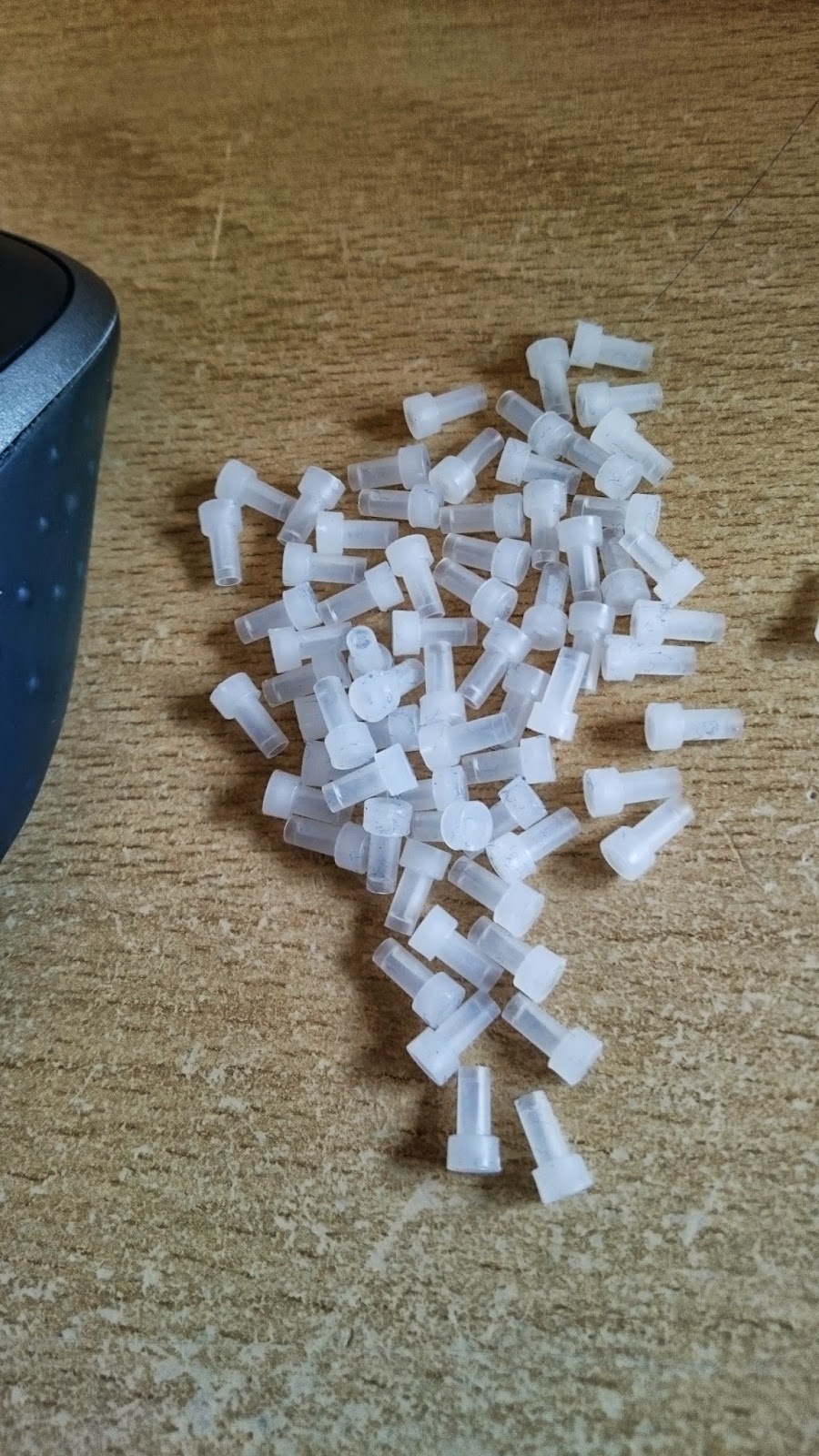
Pocket full of caps!

Pocket full of LC Fibre dust caps, after all-nighter DC relocation and SAN build.


Solstice DiskSuite Command Summary

Having a sort out and found this course handout originally written by John Furlong - Sun Trainer in 23/10/2002  (Free to distribute). Remind...